


- CompressConvertAI PDF
- Organize
- View & Edit
- Convert from PDF
- Convert to PDF
- SignMoreScan
How to Translate Legal Documents with AI
Translate legal documents instantly with AI-powered tools for internal use. Also learn when certified translation is needed for official purposes.
Need help with legal document translation? You can translate legal documents online using AI-powered tools like Smallpdf for internal use and review, or professional certified translation services when official certification is required.
With Smallpdf’s AI-powered Translate PDF, you can seamlessly translate legal documents while maintaining their integrity and context.
In this guide, we’ll walk you through how to use our tool step by step.
The Short Version
You can translate a legal document online in a few minutes using Smallpdf’s AI-powered Translate PDF tool. It works with PDFs, Word files, images, and scanned documents.
How It Works With Smallpdf
Good to Know
Suitable for internal review, drafting, due diligence, and general understanding.
OCR helps you translate scanned legal pages.
For official use, court filings, or immigration submissions, you may still need a certified human translation.
Want to safely translate your legal document with Smallpdf?
How to Translate Legal Documents Online With Smallpdf
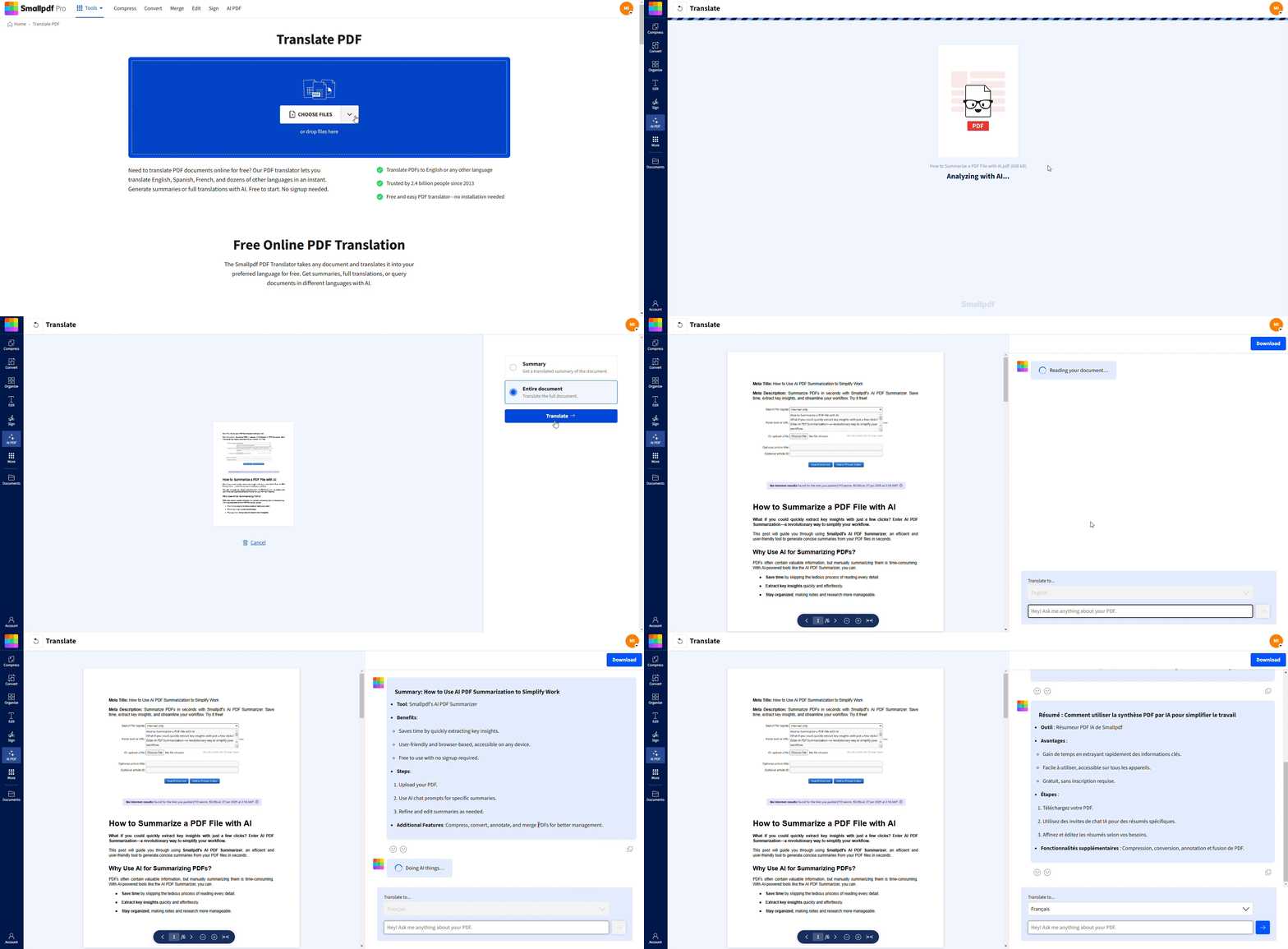
Step 1: Access the Translate PDF Tool
Start by visiting Translate PDF. This tool is designed to simplify complex translations directly within your browser.
Step 2: Upload Your Legal Document
Uploading your document is effortless:
Drag and drop your file into the designated area or click to upload it from your device.
We support multiple formats, including PDF, Word, JPG, PNG, and more.
Thanks to our OCR (Optical Character Recognition) capabilities, even image-based documents can be converted into translatable text.
Step 3: Choose Your Translation Mode
Do you need an entire document translated or just a high-level summary? Simply select the option that best fits your needs:
Entire Document: For a detailed, word-for-word translation
Summary: Ideal for extracting key insights or getting a general understanding
Step 4: Select Your Target Language
Smallpdf supports translations into major global languages, including:
English
Spanish
French
German
Chinese
Arabic
and many more
Use the dropdown menu to pick the language you need. No matter where in the world your legal dealings are, we’ve got you covered.
Step 5: Start the Translation
Click “Translate.”
Our AI works quickly to deliver results while preserving the document’s context, formatting, and structure. Unlike manual methods, it ensures that your translated document mirrors the original in clarity and coherence.
Pro Tip: While our system handles complex layouts very well, some highly detailed designs may need minor adjustments.
Step 6: Explore AI Insights
Take advantage of our built-in AI chat feature:
Clarify specific legal jargon or terms in the document.
Request additional context for challenging sections.
Use it as a multilingual assistant to better understand intricacies in cross-border legal communications.
Step 7: Download and Secure Your Document
Once you’ve reviewed the translation, download the final file. Your document remains secure throughout the process, thanks to:
GDPR compliance
ISO/IEC certification
Industry-standard TLS encryption
Together, these measures keep your information private and safe.
Quick Pre-Translation Checklist for Legal Docs
Before you start translating, make sure your document is ready:
Ensure the text is clear and readable (not blurry or handwritten).
Check that all pages are properly oriented.
Remove any sensitive information that doesn’t need translation.
Know your target audience and required formality level.
Confirm whether you need a certified translation for official use.
Supported Languages and File Types
Our PDF translator supports over 20 languages and multiple file formats to make your workflow seamless:
File Types: PDF, DOCX, TXT, JPG, PNG
Popular Languages: English, Spanish, French, German, Chinese, Arabic, Japanese, Korean, Portuguese, Russian, Italian
Output Options: Download as PDF or DOCX for easy editing
Why Choose Smallpdf to Translate Legal Documents
Here’s how Smallpdf stands apart when it comes to translating legal documents:
AI-Powered Accuracy: Advanced algorithms ensure complex legal terminology is translated correctly and consistently.
Instant Results: Get your translations within minutes, not days or weeks.
Secure Processing: Your data is safe with us with industry-standard encryption and GDPR compliance.
No Installation Required: Everything works directly in your browser—no software downloads needed.
Preserve Formatting: Maintain the original layout, structure, and visual elements of your documents.
Cost-Effective: Save money compared to traditional legal document translation services while getting professional results.
AI-Powered Translation and Summaries for Legal Docs
Our AI technology is specifically designed to handle the complexity of legal language:
Recognizes and preserves legal terminology across different jurisdictions
Maintains consistency in contract language and clause structure
Offers both full translation and summary options for quick understanding
Handles technical legal concepts with contextual accuracy
Accuracy, Consistency, and Review With AI Chat
Get the most out of your translation with our built-in quality assurance features.
Use AI Chat to clarify confusing terms or phrases.
Ask questions about specific legal concepts in the translated text.
Request explanations for complex clauses or terminology.
Get additional context for cross-border legal communications.
Legal Document Types You Can Translate
Our tool handles a wide range of legal documents across different practice areas.
Immigration Documents:
Birth certificates and marriage certificates
Academic diplomas and transcripts
Immigration forms and applications
Passport and visa documentation
Business Documents:
Contracts and service agreements
Non-disclosure agreements (NDAs)
Partnership agreements and corporate bylaws
Financial statements and audit reports
Legal Proceedings:
Court filings and legal briefs
Depositions and witness statements
Affidavits and sworn declarations
Settlement agreements and judgments
When to Use Certified Human Translation (and When AI Is Enough)
Understanding when to use AI translation versus certified human translation can save you time and ensure compliance.
Use AI Translation For:
Internal review and understanding of foreign legal documents
Initial drafts and preliminary document analysis
Non-binding agreements and informal communications
Research and due diligence purposes
Use Certified Human Translation For:
USCIS submissions and immigration proceedings
Court filings and official legal proceedings
Documents requiring notarization or apostille
Regulatory compliance in highly regulated industries
Costs and Turnaround: AI vs Certified Translators
Here’s how the two options compare:
AI Translation: Instant results at no cost, perfect for internal use
Certified Translation: Higher cost and longer turnaround, but required for official proceedings
Best Practice: Use AI for initial understanding, then get certified translation when needed for official use.
Security and Confidentiality for Legal Document Translation
Legal documents contain sensitive information that requires the highest security standards. Here’s how Smallpdf protects your data:
End-to-End Encryption: All uploads and downloads are encrypted during transmission.
Automatic File Deletion: Your documents are automatically deleted from our servers after one hour processing.
GDPR Compliance: We’re in full compliance with European data protection regulations.
No Document Storage: We don’t store, share, or access your confidential legal documents.
ISO Certification: Industry-standard security certifications ensure your data stays private.
Start Translating Legal Documents Today
Translate legal documents quickly and securely with Smallpdf. Use AI translation, summaries, and AI Chat to understand complex wording, or prepare your files first with tools like PDF to Word and OCR.
If you need more than a few tasks, Smallpdf Pro gives you unlimited use. You can start a free 7-day trial to explore every tool and see what fits your workflow.
Want to safely translate your legal document with Smallpdf?
Frequently Asked Questions
Are AI-translated legal documents legally valid?
AI translations are fine for internal review, research, and early drafting. But courts, immigration offices, and government authorities usually do not accept AI translations as official records. If a document must be filed, certified, notarized, or used in a legal proceeding, you’ll need a certified human translation.When is a certified translation required?
You’ll need a certified human translation for documents such as court filings, visa and immigration submissions, notarized statements, and anything that must meet a regulatory standard. Certified translators can attach a signed statement confirming accuracy, which is something AI cannot provide.Can I rely on AI for sensitive or high-risk legal documents?
Not for official use. AI is helpful for early understanding, cross-border communication, and internal decision-making, but it should not be the sole source when accuracy has legal consequences. Always check whether the receiving authority requires a certified translation before submitting anything.What are the risks of translating legal documents with AI?
AI may misunderstand outdated clauses, local legal terminology, or context-specific meanings. It can also miss small details such as tense changes or technical phrasing that alter the meaning of a clause. These risks matter more in regulated or formal settings, which is why certified human review is required for official use.Is AI translation safe for confidential legal information?
Smallpdf uses encrypted transfer, GDPR-compliant processing, and automatic file deletion to protect your documents. Because legal documents often contain sensitive information, AI translation is appropriate for internal use, but official filings should go through certified translators who follow jurisdiction-specific requirements.Can AI translate scanned legal documents?
Yes. Smallpdf uses OCR to extract text from scanned or image-based files so they can be translated. The results depend on scan quality—blurry, handwritten, or low-resolution pages may need cleanup before translation.Can I use AI to translate contracts for cross-border business?
Yes, for early analysis, internal alignment, and preparing drafts. It’s a good way to understand clauses, identify issues, and brief legal teams. For signing or submitting final documents, get a lawyer and a certified translator to review the final wording.Why shouldn’t I use AI translation for court documents?
Courts require certified accuracy, consistent terminology, and an accountable translator. Because AI cannot swear an affidavit of accuracy or guarantee jurisdiction-specific phrasing, its output is not accepted as an official record.Can AI help me summarize a long legal document instead of fully translating it?
Yes. Smallpdf offers a summary option that gives you the main points without translating every word. This is useful for early understanding, quick reviews, and comparing versions before requesting a full translation.What if the AI translation looks wrong or unclear?
You can use the built-in AI chat to ask about unclear clauses, phrasing, or terminology. For anything that affects your legal rights or responsibilities, get a qualified legal professional or certified translator to review the document.Translate legal documents securely with AI using Smallpdf Pro
Related Articles
